
How it works
Grok Gadgets lets your Grok Bot use small devices: a display, a light, a button. You talk to Grok Bot as usual, and it uses the device for you.
On this page
These are the roles:
- The builder makes a gadget with our SDKs and gives or sells it.
- The end user owns the gadget and talks to their own Grok Bot.
- Grok Bot runs the chat and calls the gadget's tools when you ask.
From your request to the gadget
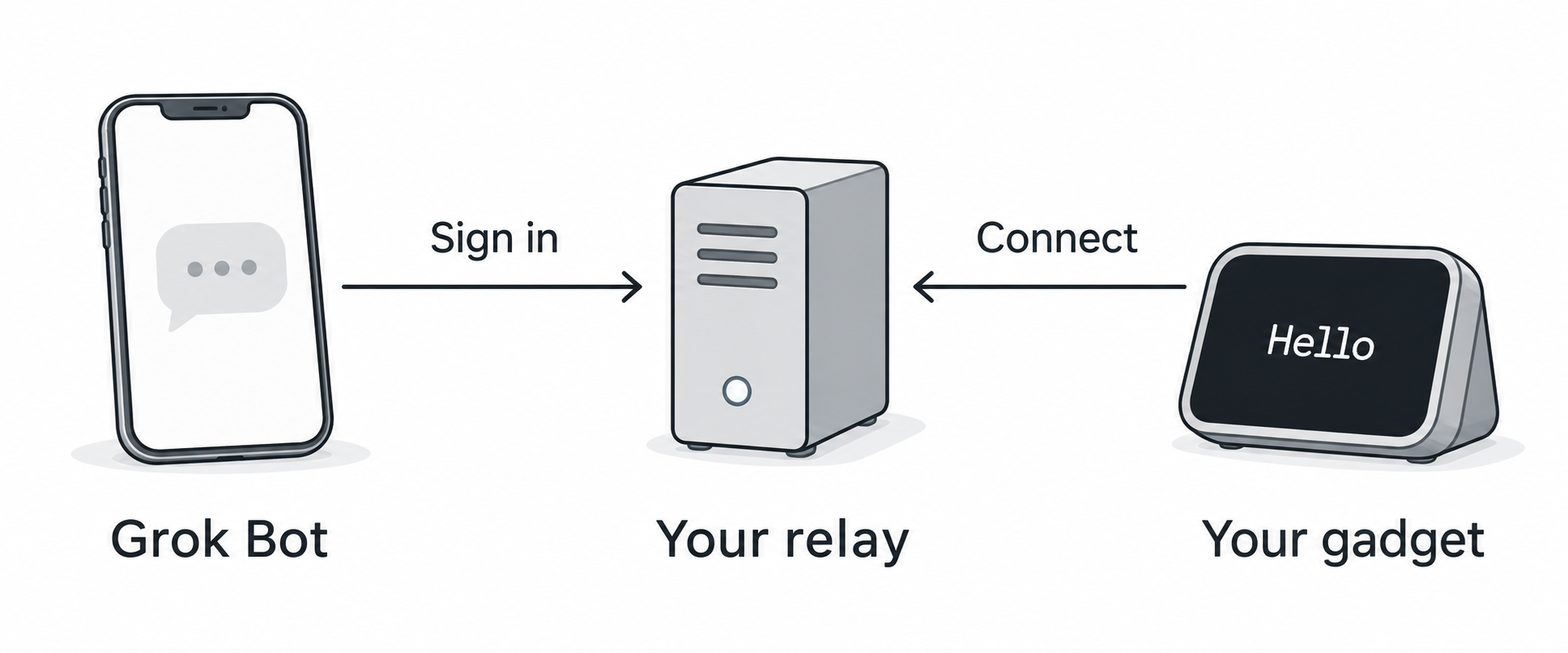
Conceptual illustration. The arrows show who starts each connection. Commands and replies then travel in both directions.
- The gadget connects out from the home Wi-Fi to the relay. No router setup and no computer at home.
- Grok Bot connects over HTTPS and signs in to the relay.
- The relay passes Grok Bot's request to the gadget and passes the answer back.
What each person does
Builder (once):
- Build the gadget with the ESP32 SDK and test it with the simulator.
- Run one relay for all their gadgets. It is the open-source gateway on a small server.
- Give each gadget its identity and the relay's address, then ship it.
End user (once per builder):
- Plug in the gadget and join it to home Wi-Fi.
- Add the builder's address in Grok Bot and sign in once.
- Claim the gadget with its code, then ask Grok Bot to use it.
A prepared gadget needs no terminal or USB data cable during setup. See phone setup and claim your gadget.
Common questions
Can the builder's relay see my Grok Bot? No. Grok Bot signs in to the relay, not the other way round. The relay only receives the gadget requests that your Grok Bot sends: the device, the command and the device's reported state. It never sees your chats, your account or your Wi-Fi password. You can remove the connection at any time.
Do I need a special Grok Bot? No. You keep the Grok Bot you use every day. The gadgets are one more connection in it, on the phone and on the Mac.
What if I do not want to use the builder's relay? The software is open source. You can run your own relay for your own gadgets. The Mac-free route guide shows how.
I own gadgets from four builders. Do I need four apps? No. Add each builder's address to Grok Bot once and sign in once for each. Then one Grok Bot chat can use all of them: "dim the lamp and show the weather on the desk display". This is the design; so far one gadget server has been tested.
What happens if the relay is down?
Grok Bot tells you it cannot reach the gadget. Nothing is queued. The gadget shows Relay... and reconnects by itself when the relay is back.
Can a button on the gadget start a Grok Bot chat? No. Button presses wait on the relay until Grok Bot reads them.
What the evidence shows
| Evidence | Result | Still open |
|---|---|---|
| Clean-room software run | A fresh relay, Linux gadget batch and scripted sign-in passed the builder guide. | This does not prove physical operation or a real Grok Bot call. |
| Owner hardware run | On a fresh relay, the owner set up the OLED kit, claimed it and used Grok Bot to show text. A signed update also passed. | The climate sensor, switch and servo examples need their own hardware tests. |
| Builder outside the project | No report yet. | Someone outside the project must follow the public guide (#269). |
The builder record keeps the software and owner results separate. See project status for current releases and the full verification history.
Choose your next step
- Have a prepared gadget? Set it up with your phone, then claim it in Grok Bot.
- Building for someone else? Ship a gadget in one afternoon.
- Want the server details? Run the gateway away from your Mac.